Skip to content

Imagine Workspace

Your whole business.
On the same page.

From the first conversation to the margin on each project. Bring relationships, sales, delivery and management finances into a workspace that follows the way your team works.

A guided demonstration. Supported implementation. People to help.

imagineWorkspace

One engagement. All the context.

Horizon Studio

Process consulting

  1. Client and people involved
  2. Proposal accepted
  3. Delivery in progress
Next stepReview the delivery with the client

Activity linked to the project

Sales, work and results connected.

Workflow illustration · fictional data

For teams that sell and deliver services

  • Consultancies
  • Agencies
  • Service businesses

The context stays with you

Six moments.
One complete story.

What was agreed during the sale needs to reach the delivery team. Workspace connects the records so everyone can follow the client, the commitment and the result.

  1. 01

    Client

    Create the company and its contacts, including while opening an opportunity.

  2. 02

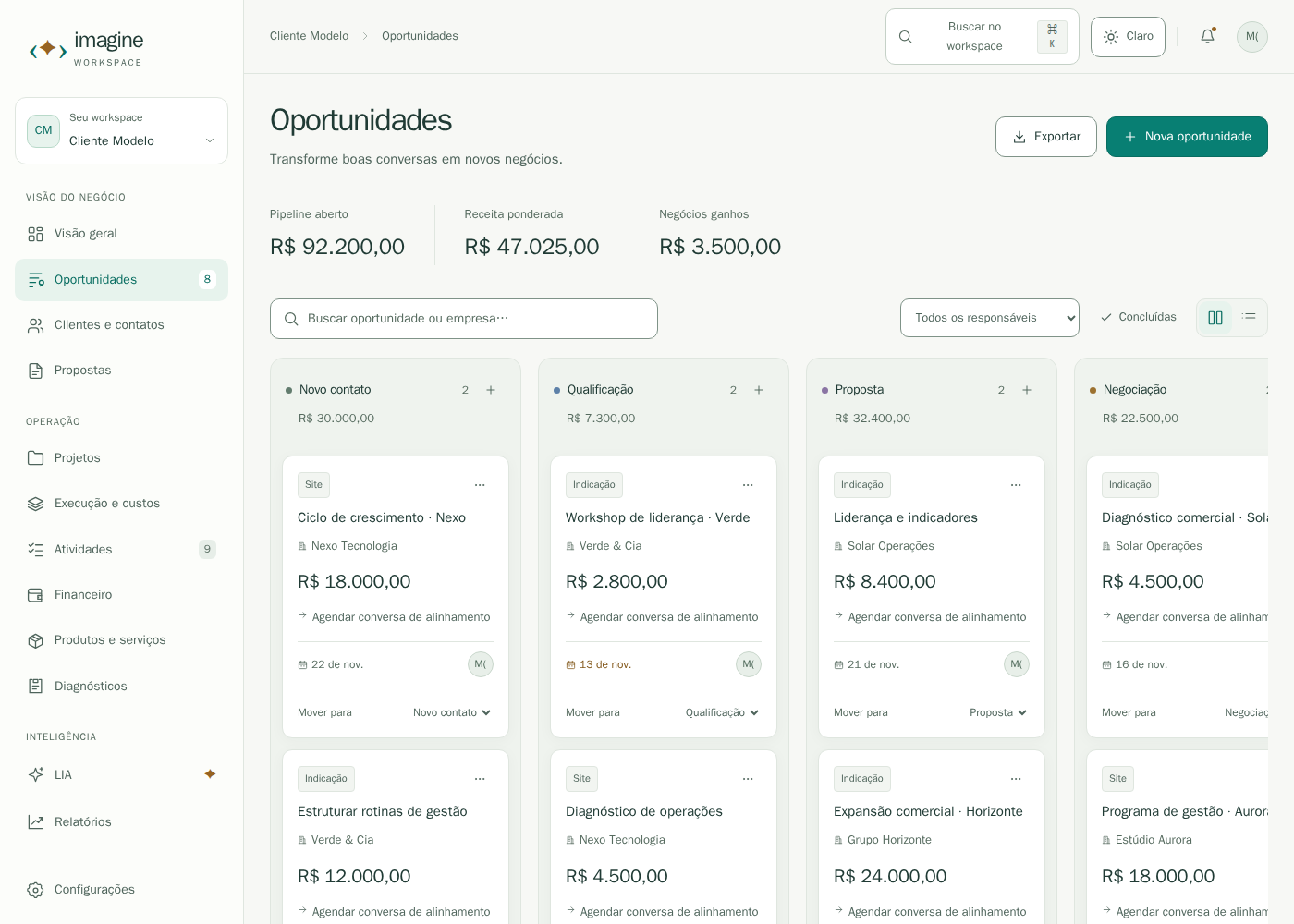
    Opportunity

    Organize value, source, stage and next step using criteria set by your company.

  3. 03

    Activity

    Turn a follow-up into a linked activity with a date and an owner, after confirming.

  4. 04

    Proposal

    Bring together products or services, prices and terms. Record commercial acceptance.

  5. 05

    Project

    On plans with ERP, acceptance creates a project and a receivable. Organize delivery and its costs.

  6. 06

    Receipt

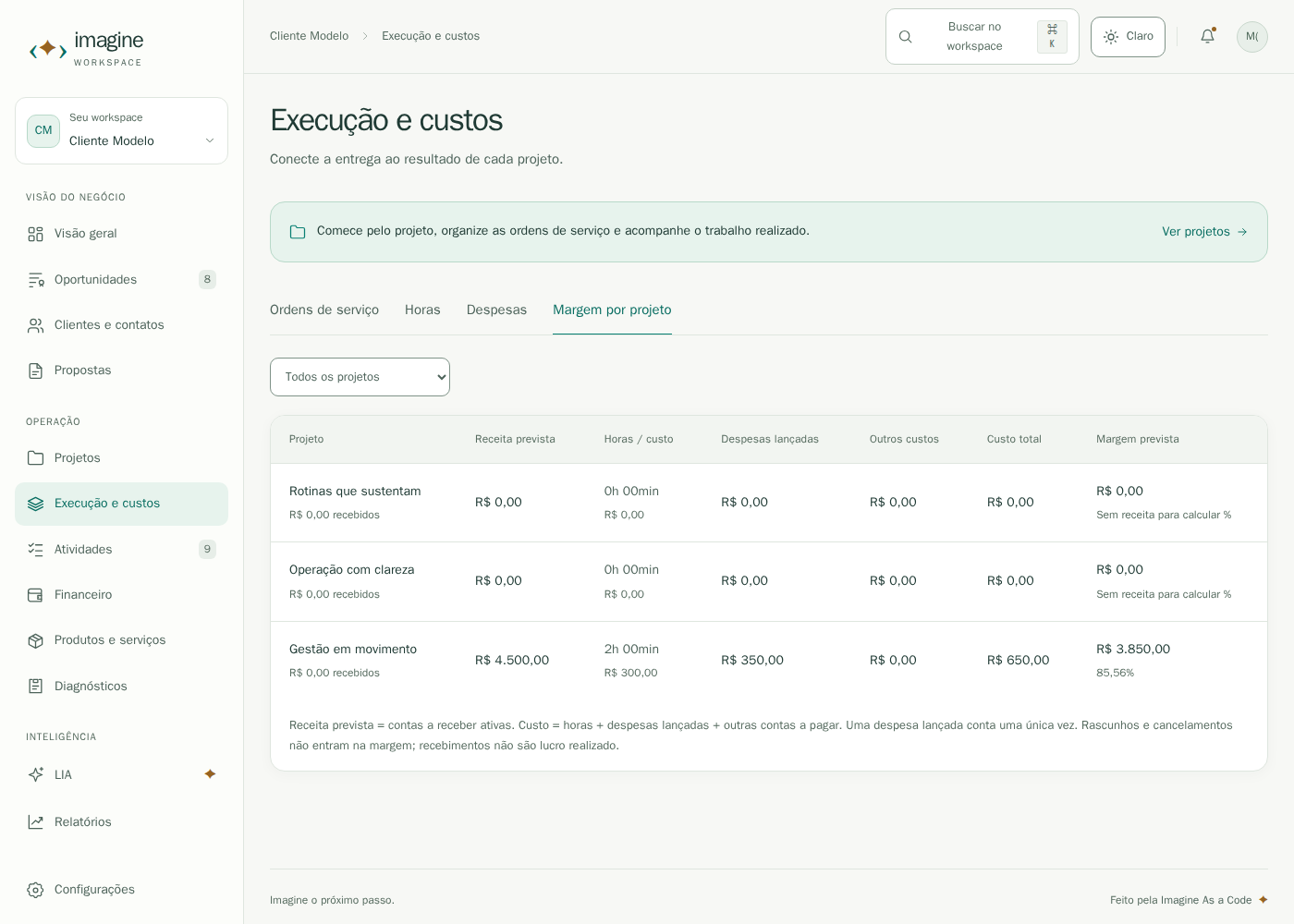
    Record payments and follow commitments, amounts received and expected margin.

The complete delivery and financial workflow is available on ERP plans. On Starter, acceptance records the sale without creating a project or receivable.

The question that changes the conversation

How much is this work earning?

A management view built from your team’s records.

Expected revenue
R$ 1,000
Labor cost
R$ 180
Posted expense
R$ 35
Expected margin
R$ 785

Fictional example: 90 minutes at R$ 120/hour, plus R$ 35 in expenses. Expected margin is not accounting profit or available cash.

03 / LIA · internal assistant

More clarity for
your next decision.

Talk to LIA about your operation, using information your role is allowed to access. It helps organize a view of the work; the team remains responsible for the decision.

  • Summarize the work

    Ask for an overview of opportunities, activities and indicators available to your role.

  • Organize priorities

    Identify areas that need attention to guide upcoming contacts and deliveries.

  • Review suggestions

    Assess the answer and confirm only the permitted actions that make sense.

LIA Imagine Workspace

What needs my attention today?

Start with pending activities and opportunities without a next action. Check each client’s commitments before planning the next contacts.

Your team reviews and decides.

Illustrative conversation. AI can make mistakes; verify answers before using them.

Available on Enterprise, subject to permissions and agreed usage limits. LIA is internal; it is not the chatbot serving clients on WhatsApp.

Choose your scope

Start with what your operation needs.

Three feature combinations. During the demonstration, we align the plan, users, usage limits, implementation and commercial terms for your company.

Starter

Organize the sale.

CRM to bring relationships together and keep sales moving.

  • Companies and multiple contacts
  • Opportunities and activities
  • Proposals, catalog and assessments

No ERP or LIA.

Discuss this plan

Enterprise

Expand your perspective.

CRM and ERP, with LIA supporting team decisions.

  • All Professional features
  • Internal LIA with authorized context
  • AI usage tracking and feedback

AI usage is subject to agreed limits.

Discuss this plan

Engagement by proposal. Pricing, seats, allowances and terms are agreed with Imagine; this page does not take payment or create an account automatically.

A shared core. Your way of working.

For teams that sell expertise, time and delivery.

Sales stages, sources, catalog, expense categories and default hourly cost can be configured for each company. The process has room to reflect your operation.

Consultancies

Connect assessment and proposal to the project. Track team effort, expenses and the expected margin of each engagement.

Agencies

Bring together the client relationship, opportunities and activities. Connect the approved scope to project delivery.

Service businesses

Organize opportunities, service orders and owners. Record labor costs and follow receipts.

These are example applications, not client case studies. Specific processes and customizations are evaluated with Imagine.

Access and responsibility

Each company in its own space.
Each person with their own access.

Access considers the company, the person’s role and the plan’s features. A client administrator does not gain access to other clients on the platform.

MFA from the first sign-in

The password is followed by authenticator setup and verification. Two-factor authentication is required to use the system.

Permissions checked on the server

The role controls what a person can read or change. The same rule applies to the interface, API and context used by LIA.

Supported operations

Monitoring, backups with verified restores and operation history support maintenance. Support terms are aligned during contracting.

Roles to share the work

Administrator
Configures their company and manages the permitted access for their team.
Management
Follows and runs authorized sales, projects and operations.
Sales
Works with clients, opportunities, activities and proposals, without access to ERP costs.
Finance
Handles the financial records and costs authorized for their role.
Read-only
Views permitted information without changing records and without access to finances or ERP costs.

Available features also depend on the contracted plan.

Guided implementation

A start with direction.

Talk to people who know the product and support its implementation. The scope is agreed before you begin.

  1. 01

    Understand your routine

    We map the sales process, deliveries and controls your team needs.

  2. 02

    Demonstrate and define the scope

    We show the workflows, assess fit and align the plan, limits and terms.

  3. 03

    Prepare the company and access

    We configure the workspace, initial settings and team roles.

  4. 04

    Support the first steps

    We guide usage and agree on priorities for improvement. Migration and customizations receive a separate assessment.

Before you begin

The right questions
for a clear decision.

Can’t find your question? Bring it to the demonstration. The conversation starts with your operation’s reality.

Does Workspace work for any company?

It brings together common sales relationship and service delivery processes. Consultancies, agencies and service businesses are examples. The demonstration is the time to assess fit for your industry, data volume and specific business rules.

Do I need CRM, ERP and LIA together?

No. Starter includes CRM; Professional adds management ERP; Enterprise also includes internal LIA. Features, users, limits and terms are aligned in the proposal. Plan changes need to consider existing data and usage.

What does the ERP do, and what is not included?

The ERP connects projects, service orders, time, expenses, payables and receivables, payments and expected margin. Tax invoicing, payroll, statutory accounting and bank transactions are not part of the current product. Recording a payment does not move money in a bank account.

Are LIA and the WhatsApp chatbot the same thing?

No. LIA is the internal team assistant, available on Enterprise. The chatbot is for customer service and has its own context, configuration and limits. WhatsApp is not active in this offering yet and requires setup and validation before it is made available.

How does access work for my team?

Each person has an account with mandatory MFA and a company role. The role defines permitted actions within the contracted features. Imagine’s technical administration is separate from client administration; clients cannot access other companies.

Can I adapt the pipeline or bring my data?

Workspace allows configuration of process elements such as probability criteria, sources and next-action types. Data migration and customizations require a format, volume and scope assessment; subscribing does not automatically import data from any system.

Can I integrate other systems through the API?

There is a documented API with authentication, MFA, permissions and company isolation. Each integration needs a workflow, security and limits assessment. Ready-made Meta, Google or banking integrations are not included in the current offering.

How do I start, and how does payment work?

Request a demonstration by email. After learning about your operation, Imagine provides a proposal covering scope, implementation and commercial terms. The button opens your email application; it does not confirm an appointment, create an account or charge you.

Imagine Workspace

Let’s connect
the pieces of your operation.

Tell us how you sell, deliver and track results. We show Workspace with a focus on what your team needs to solve.

Book a demonstration [email protected]

Opens your email application. Our team arranges a time with you.

I'm already a client